


FIFA Official App
4.09.86K Reviews
App Specs
- Version
- 6.5.6
- Updated On
- License
- Free
- Downloads
- 10,000,000+
- Developer
- FIFA
- Categories
- Sports
- Platform
- Android, iOS
Screenshots
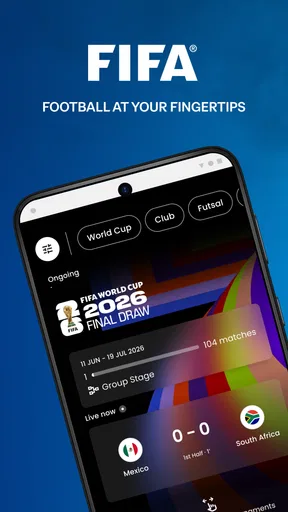
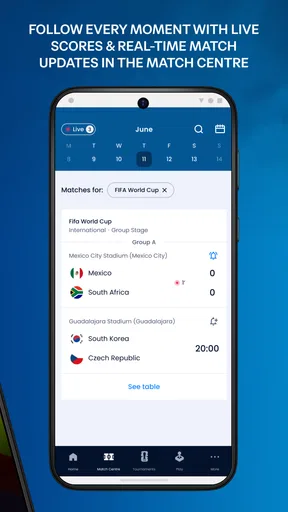
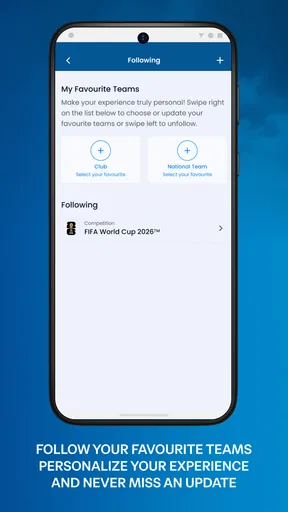
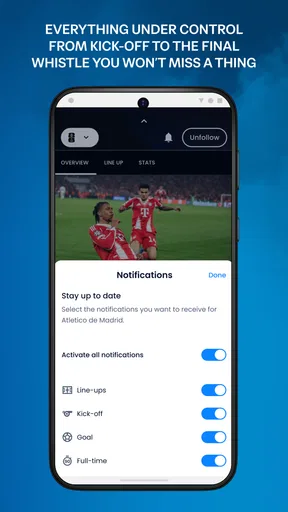
 Analysis by AppCompare
For a match I can’t watch from the start, I want more than a score: I want to know what happened, when it happened, and whether the numbers explain the result. That is where the FIFA Official App makes sense. I see it as a companion for following football, rather than a replacement for watching a match or checking every club’s own channel. Its appeal is immediate, but whether it earns a lasting place on my phone depends on how often I need its broad, international view.
A quick reason to install it
The first-week attraction is easy to understand: scores, news, and match information bring several football habits into one place. When I’m away from a screen, I can check a result; when I have a spare minute, I can read a preview or look at a match’s statistics. The app is free, and FIFA makes it, so it is a straightforward option for fans who want an official source alongside their usual sports coverage.
I would start by choosing only the teams and competitions I genuinely follow. That small bit of setup can make the experience more useful: instead of treating the app as a feed to browse at random, I can use it as a route to the football that matters to me. It also helps keep notifications purposeful. If every team or event is selected, alerts can become noise before they become a habit.
When a match is happening elsewhere
A realistic use is checking a game during a work break, on a commute, or while family plans keep me away from the television. I can glance at the score, then open the Match Center when I want context: line-ups, minute-by-minute commentary, and match stats can answer questions a score alone leaves hanging. Did the game turn on a late change in momentum? Was the result supported by the match numbers? That kind of check is more satisfying than refreshing a bare scoreboard.
For a fan who follows international football or several competitions, this broad scope is a strength. A club-focused app may go deeper into one team, while a general sports-score app may make it quicker to scan many sports at once. FIFA’s app sits in a different spot: it is for someone who wants football first and values a source associated with the sport’s governing body. That focus is useful, though it may not make it the best single app for detailed coverage of one particular club.
What I would use it for over time
After the novelty of exploring sections wears off, the app needs to solve repeat problems to justify its space. The most durable pattern is simple: keep a few relevant favorites, use alerts for the moments I care about, and open match details when I need more than the final score. News and videos can give me another reason to return, but I would not expect every visit to offer something essential. Its lasting value is strongest as a practical football reference, not as a feed that demands constant attention.
That distinction matters if you are deciding whether to keep it installed. If you follow football casually and only want a score now and then, a quick search or the sports section of a general news app may be enough. If you routinely track multiple matches, want commentary and stats in one place, or enjoy checking football news between games, the dedicated app has a clearer role. I would treat it as a useful second screen, not as a substitute for live viewing or a club’s most specific updates.
Worth Reading Before You Choose

Flipboard Shows What News Apps Must Do Beyond the Feed

Switching to Android Auto Means Rethinking Your Driving Routine

Google Calendar Makes a Crowded Week Easier to Manage

Ludo King Makes the Most of the Minutes Between Plans

Baby Panda World Brings Quick Play to Modern Phones, but Its Game Library Feels Busy

ESPN’s Live Game View Makes Following Close Games Easier
Keeping the app useful rather than noisy
Personalization works best when I am selective. I would pick a small set of teams and competitions, then review those choices if a season or tournament ends. That is a practical way to avoid irrelevant alerts and make the home experience feel intentional. Notifications are helpful when they answer a question I actually have—such as whether a match has finished—but less helpful when they interrupt me for every development I do not need to follow.
There is also a trade-off between breadth and depth. A FIFA-wide view can help me follow football beyond one club, but a supporter looking for every local team update, transfer detail, or club-specific analysis may prefer that club’s own app or a specialist outlet. I would use the FIFA app for the match picture and wider football context, then turn elsewhere when I need a particular team’s most detailed coverage. Keeping those roles separate makes the app easier to maintain rather than expecting it to do everything.
Who is likely to keep it
I think it suits fans who check football repeatedly through the week, especially people who follow international competitions or want a central place for scores and match details. It can also help someone who misses portions of games: commentary and stats give a way to reconstruct the flow without pretending that a text update is the same as watching the action. If video is part of your routine, highlights and interviews offer another kind of catch-up, although I would choose video when I have time and a suitable connection rather than assume every match can be followed that way.
It is less compelling for someone who follows one club exclusively and already gets everything they need from that club’s channels, or for a reader who wants broad sports coverage rather than football-specific attention. The app’s purpose is focused, and that is both its advantage and its boundary. I would also avoid turning on every alert simply because the option is there. A sports app should fit around my day, not make every match feel urgent.
Features That Score a Goal
The FIFA Official App is packed with features that make it a must-have for football aficionados. First off, the app provides live score updates. Whether you're stuck in a meeting or lounging at home, you'll get the latest scores faster than you can say "goal!" The real-time updates are super reliable, so you won't miss a beat.
Another cool feature is the news section. It's like having a personalized sports news hub in your pocket. From player transfers to match previews, the app keeps you informed about everything happening on and off the pitch. Plus, the articles are written in a way that's easy to digest, even if you're just skimming through.
Exclusive Videos and Highlights
Now, let's talk about the exclusive content. The app offers a treasure trove of videos, including match highlights and interviews with your favorite players. It's a fantastic way to catch up on games you missed or relive the magic of a stunning goal. The video quality is top-notch, making the experience even more immersive.
Match Center: Your Personal Football Arena
One feature that really stands out is the Match Center. It's like having your own command center for all the action. You can view line-ups, match stats, and even get minute-by-minute commentary. It's perfect for those who love diving into the nitty-gritty details of each game.
- Line-ups and formations
- Minute-by-minute commentary
- Detailed match stats
The Match Center is so comprehensive, it feels like you're watching the game live, even if you're miles away from the stadium.
Personalized Experience
One of my favorite aspects of the app is how it personalizes the experience. You can select your favorite teams and competitions, and the app tailors the content accordingly. It's like having a customized football experience that's all about you.
The notifications are another big win. You can set alerts for your favorite teams, so you're always in the know. Whether it's a goal, a red card, or a final whistle, the app keeps you updated in real-time.
Design and Usability
The design of the FIFA Official App is sleek and user-friendly. Navigating through the app is a breeze, thanks to its intuitive interface. Everything is neatly organized, so finding what you need is quick and easy. Plus, the app runs smoothly without any annoying lags or crashes.
Another plus is the app’s availability in multiple languages, making it accessible to football fans around the world. Whether you speak English, Spanish, or any other major language, the app has got you covered.
A closer look at its place in a football routine
In practical use, I would keep it for the occasions when I need a quick, football-specific check rather than open it automatically throughout the day. Before a match, a glance at the preview and team information can help me get oriented; during play, the Match Center gives me a text-based way to follow along; afterward, stats and highlights help fill in what I missed. Thinking in those stages is more useful than trying to consume every article and video the app surfaces.
One small but worthwhile habit is to distinguish between following a match and following a team. If I care about a particular game, I can use its match page as the destination and avoid leaving a broad stream of alerts active. If I care about a team across a competition, favorite selection makes more sense. That choice reduces friction: I spend less time sorting through updates and more time getting the information I opened the app to find.
For a match day with several games at once, I would use the app as a comparison tool rather than trying to watch every event through it. Scores show which games deserve a closer look, and match stats provide a quick way to compare how different contests are unfolding. This is especially handy when I am deciding which game to put on, or when I want to understand why a result feels surprising. It does not replace the atmosphere or visual detail of a broadcast, but it can make limited viewing time more informed.
Limits that affect the habit
The main risk is not that the app lacks football material; it is that a steady stream of scores, news, and alerts can make checking feel compulsory. I would disable anything that does not serve a clear purpose and use the app at chosen moments: before a game, during a break, or after the final whistle. That turns it into a tool I control, rather than another feed asking for attention. Fans who enjoy following every development may welcome frequent updates, but a casual supporter can quickly find that level of activity tiring.
There is also a difference between information and access to the event itself. Commentary and statistics can help me follow the shape of a match, but they cannot show the build-up to a chance or let me judge a disputed moment visually. When the match itself is the priority, a broadcast or a live video source is plainly the better choice. I see the app as a companion for moments when watching is impractical, and as a reference afterward—not as a workaround that makes watching unnecessary.
It is worth being realistic about what “one place” means for a football fan. The app can gather useful FIFA-related football coverage and match information, but my own interests may still lead me to a club source for local detail or another sports service for a wider mix of events. I would not install it expecting every niche angle to be covered in equal depth. Its usefulness comes from its focused football role, and the best setup may be to pair it with one other source rather than ask it to replace an entire sports routine.
Fit, access, and the lasting verdict
As a sports app from FIFA, it has a clear identity, and the numbers suggest it has found a substantial audience: it has more than ten million installs, with an average rating of three and a half from around 351,000 ratings. Those figures do not tell me whether its approach fits my habits, but they do place it among widely used football companions. It is free, rated for Everyone, and its current version is 6.5.3; it runs on operating systems beginning with version 7.0. The app has been available since November 27, 2013, so it is not a new experiment in the football-app space.
For me, the clearest reason to keep it is repeated utility: I follow enough football that scores, match context, news, and video each have a place in my week. If I only check a major final occasionally, I would probably skip a dedicated install and use a general news or score source instead. If I want club-level depth, I would add the club’s own channel rather than expect this app to cover every supporter need. That is a more honest recommendation than calling it essential for everyone.
My long-term advice is to give it a focused trial, personalize it lightly, and judge it by whether it saves time or helps you understand matches you cannot watch. Keep only the alerts that make a difference, and return for match details or highlights when you have a reason. The FIFA Official App earns space most convincingly as a football-first companion that is useful on busy days and easy to ignore when there is nothing you need from it. If that sounds like your kind of relationship with a sports app, I would give it a place in your routine.
Pros
- Comprehensive match coverage and live updates.
- Exclusive videos and behind-the-scenes content.
- User-friendly interface and design.
- Personalized notifications for favorite teams.
- Detailed player and team statistics.
Cons
- Requires a stable internet connection.
- Occasional delays in live updates.
- Limited content without registration.
- Can consume significant battery power.
- Ads can be intrusive for free users.
FAQs for FIFA Official App
What features does the FIFA Official App offer?
The FIFA Official App provides a comprehensive suite of features for football enthusiasts. Users can access live scores, match highlights, and news updates. Additionally, the app offers exclusive interviews, in-depth coverage of major tournaments, and personalized notifications for your favorite teams and competitions.
Is the FIFA Official App free to download and use?
Yes, the FIFA Official App is free to download on both Android and iOS devices. While the app itself offers a rich array of features at no cost, be aware that data charges from your mobile provider may apply when streaming videos or using certain features.
Can I follow specific teams and leagues on the FIFA Official App?
Absolutely. The app allows users to customize their experience by selecting favorite teams and leagues. This enables you to receive tailored updates and notifications, ensuring you never miss important news, match results, or upcoming fixtures related to your chosen teams.
Does the FIFA Official App provide live streaming of matches?
The FIFA Official App does not offer live streaming of matches. However, it provides real-time updates, minute-by-minute commentary, and video highlights. For live streaming, you may need to access official broadcasters or streaming services that hold the rights to broadcast FIFA events.
Is the FIFA Official App available in multiple languages?
Yes, the FIFA Official App supports multiple languages, making it accessible to a global audience. Users can choose their preferred language from the settings menu, ensuring that they can enjoy news, updates, and features in a language they are comfortable with.


